Every cost captured.
Every invoice moving.
DPX-Pro handles both sides of project spend. Receipts and card charges become structured Procore Direct Costs at the point of sale. Vendor invoices are matched to the right commitment and filed as subcontractor invoices — not stranded in an inbox. No end-of-month cleanup.
One tap. Right bucket. Right contract.
At point-of-sale, workers choose Company Expense or a specific project — once. DPX-Pro routes the receipt and applies the right category, so company overhead never lands in project costs. When an invoice arrives against a subcontract or PO, DPX-Pro surfaces the matching commitment and files it there instead — so billing lands on the contract it belongs to.
See DPX-Pro in action
Three minutes: receipts from the field, subcontractor invoices from Outlook, daily briefs and project boards — all landing in Procore.
From Point-of-Sale to Pay Request — Without the Chaos
Direct costs don’t just need to be captured — they need to be structured, aligned to budget, and ready for approval and billing. DPX-Pro standardizes the entire flow.
Capture at POS
Record receipts, card charges, and Time & Materials at the point of sale from mobile or inbox — each picked at capture and published as a Procore Direct Cost. Preview attachments, validate inputs, and eliminate missing documentation.
Publish to Procore
Create structured Direct Costs with consistent metadata, supporting attachments, and clean cost alignment inside Procore.
Approval-Ready Backup
Generate organized PDF reports with merged receipts — ready for internal approvals, audits, and client pay applications.
One suite. Three surfaces.
Use the tool that fits the moment — and keep outputs consistent across the company.
DPX-Pro iOS
Fast entry, strict receipt cropping, clean attachment previews.
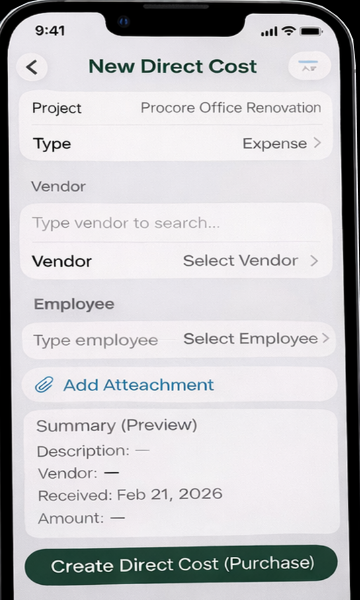
- Create Direct Costs in seconds
- Keep employees, vendors, projects cached
- Attachment-first workflow
- Share receipts or PDFs into DPX-Pro from any app
- Capture Time & Materials (T&M) — same flow, picked at capture
DPX Outlook Add-in
Capture receipts and file vendor invoices right from the inbox — no forwarding chaos.
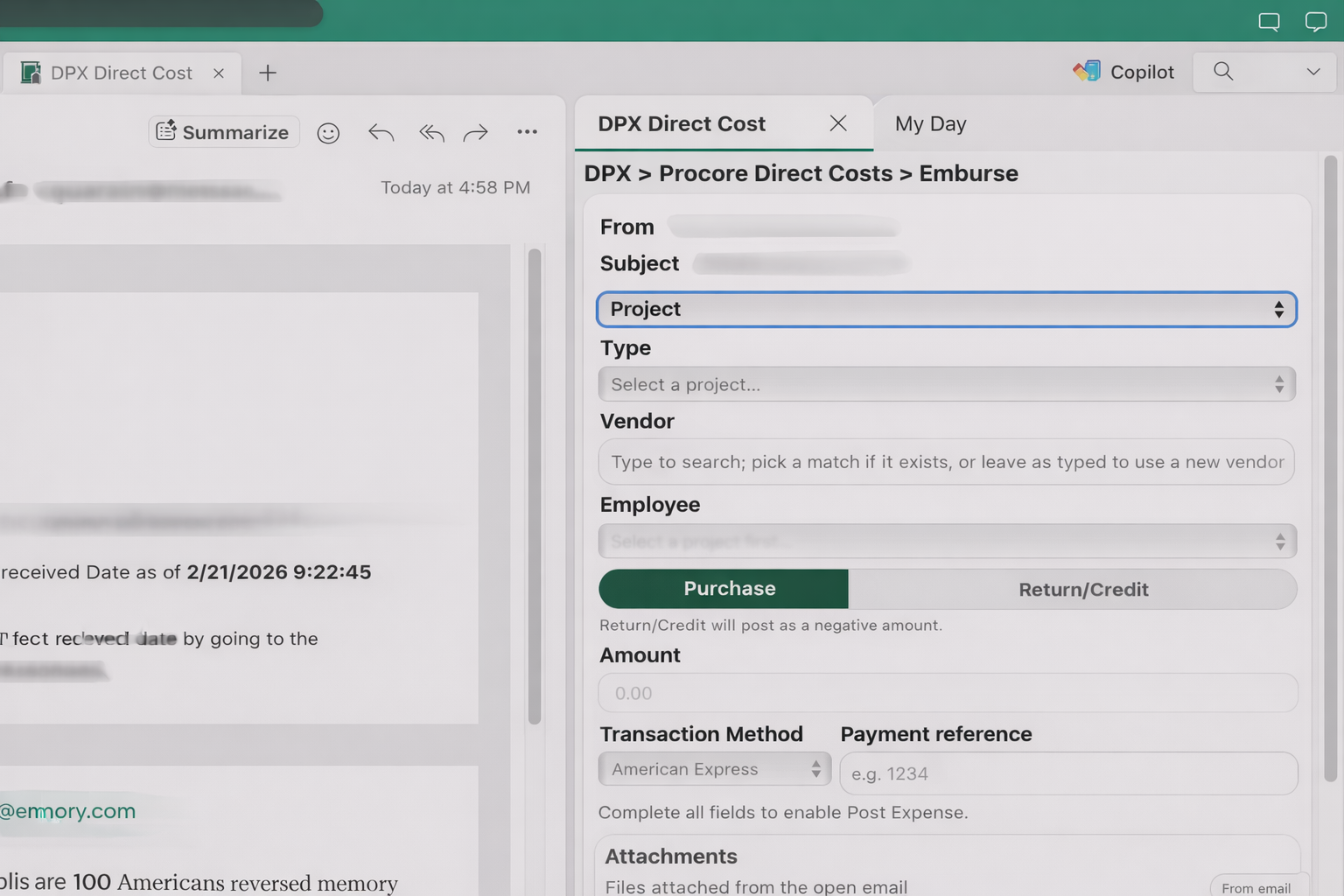
- Upload attachments to Procore
- Vendor has an open commitment? File the invoice against it in one step
- Invoice-to-expense rerouting handled automatically
- Minimal, task-focused UI
DPX Cost Reports
Direct cost and commitment invoice reports, with supporting documents merged in.

- PDF cover summary + merged attachments
- Commitment invoice view — status, percent complete, aging
- Background worker for larger sends
- CSV and Excel export when needed
Need a fast walkthrough?
Advanced Tools That Bridge the Procore Gap
The Operations plan adds web tools that handle the work Procore doesn't — turning field data into polished, branded deliverables in a few clicks.
AI Meeting Records
The full meeting lifecycle — agenda, minutes, and action items — in your house style.
- AI drafts agendas and minutes from your notes or a transcript
- Decisions and action items become Procore Observations
- Branded house-style PDF plus editable Word output
Custom Daily Log Reports
Branded weekly daily-log packages, assembled from Procore in one click.
- Weather, manpower, notes, deliveries, and inspections per day
- Choose the photos that tell the story — or let DPX auto-pick
- Branded PDF, emailed or downloaded for the project record
Credit Card Reconciliation
Match card statements to Direct Costs without the spreadsheet.
- Upload statements and match charges to Procore Direct Costs
- Surface unmatched charges and exceptions
DPX-Pay · ADD-ON
Procore timecards, ready for payroll — without the spreadsheet shuffle.
- Review and edit timecard entries from the dashboard
- Export in Paychex format, or a universal export for other payroll systems
Integrates With Your Existing Tools
DPX-Pro is designed to work alongside the platforms your team already uses — without forcing a new accounting workflow.
Project + Cost Systems
- Procore® (Direct Costs workflows)
- Cost codes / WBS alignment (configuration dependent)
Capture + Communication
- Microsoft Outlook® (inbox capture via add-in)
- Apple Mail® on iOS (drafted email workflows)
- Paychex Flex® (payroll-ready export via DPX-Pay)
Accounting & ERP
- Import-ready CSV exports for accounting platforms — Sage, QuickBooks, Acumatica, Viewpoint, and more
- No new accounting workflow required — DPX produces files your team imports
- Direct ERP integration coming soon (DPX-Connect add-on) — automated cost sync & journal entries
Card Programs
- American Express® (credit-card reconciliation in the dashboard)
- Match statement charges to Procore Direct Costs
More Than Receipt Upload
DPX-Pro is an operational layer for Direct Costs — built to protect cost integrity from field capture through billing. It standardizes how costs are recorded, documented, and packaged so approvals and client pay requests don’t turn into cleanup work.
Cost Integrity
Consistent metadata and attachment handling reduces miscoding, missing receipts, and “who bought this?” follow-ups.
Billing Readiness
Professional report outputs (summary + merged receipts) help teams support owner billing, audits, and closeout.
Workflow Standardization
A repeatable process across iOS, Outlook, and Web keeps the field and office aligned — without changing your accounting system.
Ready to standardize Direct Costs?
Tell us what you’re using today (Procore tools, card programs, reporting requirements), and we’ll show you the cleanest DPX-Pro workflow.